
Is Path of Building Safe? Download and Security Guide
Path of Building: Complete Guide to the Path of Exile Build Planner
Path of Building is a powerful planning tool designed for Path of Exile players. It helps users create, test, and refine character builds before making changes in-game.
Players can use it to study damage, defense, passive skills, equipment, gems, and other important build details. This makes it easier to understand how different choices can affect a character’s overall performance.
This guide explains the main functions of Path of Building and shows how it can support better build planning.
What Path of Building Is
Path of Building, often called PoB, is a free build planner and calculation tool for Path of Exile. It allows players to create a complete character setup in a separate program without spending in-game currency or resources.
The tool can calculate damage, life, energy shield, resistances, attack speed, critical strike chance, and many other statistics. Players can also add equipment, choose skills, edit the passive tree, and test different combat settings.
Path of Building is useful for both new and experienced players. Beginners can use it to follow shared builds, while advanced players can compare upgrades and improve complex character setups.
It does not replace the actual game. Instead, it provides a Path of Building safe testing environment where players can plan changes before applying them to their characters.
Key Features and What They Do
Path of Building includes several tools that help players plan complete character builds. These features allow users to test passive skills, gems, items, damage, defense, and different build versions before making changes in the game.
Each feature focuses on a specific aspect of building planning, making it easier to understand how a single change can affect the overall character.
Passive Skill Tree Planning and Respec Previews
The passive skill tree planner allows players to select nodes and create a complete progression path. It shows how many passive points are required and helps users decide which damage, defense, life, or utility nodes to take.
Players can also remove or replace nodes to preview respec options. This is useful when comparing different routes without spending in-game refund points.
Gem and Skill Link Simulation
Path of Building allows users to add active skill gems and connect them with support gems. The program then calculates how each support gem changes damage, attack speed, critical chance, mana cost, and other skill statistics.
Players can compare different gem combinations and check whether a new support gem provides a real improvement. Gem levels, quality, and alternative versions can also be adjusted to improve testing accuracy.
Item Editor, Crafted Gear Simulation, and Socketing
The item editor lets players create or modify weapons, armor, jewelry, flasks, and other equipment. Users can add modifiers, change item values, and simulate rare or crafted gear.
This feature is helpful for checking whether a planned upgrade is worth buying or crafting. Players can also manage sockets, colors, links, and gem placement to match their intended setup.
DPS, EHP, and Damage Breakdown Calculations
Path of Building calculates damage per second and displays detailed information about how that damage is produced. It can show attack or cast speed, critical damage, elemental damage, poison, ignite, and other damage types.
The tool also estimates the effective hit pool, commonly referred to as EHP. This helps players understand how much damage their character can withstand after accounting for life, energy shield, armor, evasion, resistances, and other defensive layers.
Import/Export, Build Sharing, and Presets
Players can import an existing Path of Exile character or open a build shared by another user. This saves time because skills, items, passive nodes, and configuration settings can be loaded directly into the program.
Builds can also be exported as codes or shared through supported links. Presets and saved versions make it easier to compare different setups, such as budget gear, endgame gear, or alternative skill choices.
Editions, Forks, and Compatibility
Path of Building is available in different editions because the original open-source project was later continued by community developers. Although both versions share the same basic build-planning system, their updates, features, and compatibility are different.
Official App vs Community Edition: Differences and Benefits
The original Path of Building introduced important tools such as passive tree planning, damage calculations, item editing, and build importing. However, it is no longer the preferred version for current Path of Exile content.
Path of Building Community Edition continues the original project with regular updates, improved calculations, and support for newer game mechanics.
| Feature | Original Path of Building | Community Edition |
|---|---|---|
| Updates | No longer regularly updated | Actively maintained |
| New league support | Limited | Supports newer leagues and mechanics |
| Skills and items | Older game content | Updated gems, items, and modifiers |
| Calculations | Basic calculation system | Improved damage and defense calculations |
| Bug fixes | Limited fixes | Regular community fixes |
| Recommended for | Older builds and references | Current build planning |
For most players, the Community Edition is the better option because it provides improved compatibility and more accurate build results. The original edition remains important as the foundation of the tool, but it is less suitable for planning modern Path of Exile builds.
Download, Installation, and Setup
The Path of Building should be downloaded from the official Community Edition website or its verified GitHub release page. Avoid unofficial download websites because they may provide outdated or modified files.
Before installation, confirm that you are downloading the version made for Path of Exile 1. Path of Building for Path of Exile 2 is maintained as a separate project.
Platform Installers: Windows, macOS, Linux: Basic Steps
Windows provides the simplest installation process because the official releases include an installer and a portable package.
- Download the latest setup file from the official releases page.
- Open the installer and choose the installation folder.
- Complete the setup and launch Path of Building.
- Allow the application to download required data when prompted.
The portable version can also be extracted and opened without a full installation. Official GitHub releases normally provide several downloadable assets for each version.
macOS does not have the same level of official support as Windows. Community-maintained builds are available, but their compatibility can depend on the macOS version and processor. A common method is to download the community ZIP package, extract it, and move the application into the Applications folder.
Linux users can install an unofficial Flatpak package from Flathub. After Flatpak support is enabled, the application can be installed through the software center or with the provided Flatpak command. The Flathub package is community-maintained and currently supports x86_64 systems.
Updating and Managing Versions
Path of Building receives updates for passive trees, skills, items, calculations, and newly released league content. Keeping the application updated helps prevent incorrect damage results, missing gems, and import errors.
Windows users can normally install updates through the application when prompted. The newest installer or portable package can also be downloaded manually from GitHub.
Linux updates are usually managed through Flatpak, while community macOS builds may require downloading the newer package and replacing the older application. Users should save or back up important build files before reinstalling, testing development releases, or moving between different editions.
How to Use Path of Building: Core Workflows
Path of Building uses separate tabs for the passive tree, skills, items, calculations, and configuration. A basic workflow starts by importing or creating a build, then checking its gear, gems, damage, and defense.
Importing a Build (pastebin, code, in-game export)
To import a shared build, open New, select Import/Export Build, then paste the provided build code or a supported sharing link into the import field. PoB can process compressed build codes and links from supported build-sharing websites such as POBb.in.

A basic import process includes:
- Copy the complete build code, POBb.in link, or supported Pastebin link.
- Open the Import/Export Build section.
- Paste the link or code into the correct field.
- Select Import and confirm that the tree, gems, and equipment have loaded.
- Save a separate copy before making changes.
Players can also import passive skills, items, and gems from an existing Path of Exile character. The character profile may need to be publicly accessible before PoB can read its information.
Creating a Build From Scratch: Tree, Gems, and Passives
Select the character class and ascendancy, then open the passive tree and choose suitable damage, life, defense, and utility nodes.
Add the main skill and support gems in the Skills tab. Include movement skills, auras, curses, and defensive gems where needed.
Editing Gear, Crafting Simulations, and Socket Setups
The Items tab allows players to add, import, or edit equipment. Users can test rare items, crafted modifiers, socket colours, and gem links before spending currency in the game.
This helps compare different gear upgrades and identify which item provides better damage or survivability.
Running Simulations and Interpreting DPS/EHP Outputs (image)
The Calcs tab shows damage, attack or cast speed, critical chance, resistances, and defensive values.
DPS represents damage output, while EHP estimates how much damage the character can survive. Configuration settings should remain realistic, as incorrect buffs or enemy options can lead to misleading results.
Leveling Workflow vs Endgame Tuning
Leveling builds should focus on affordable gear, available gems, and a practical passive tree path. Saving different versions for early acts and mapping can make progression easier.
Endgame tuning focuses on stronger equipment, crafted modifiers, boss settings, and balancing damage with defense.
Optimizing and Comparing Builds
Path of Building helps players test different build versions without spending in-game currency. Items, skills, passive nodes, and configuration settings can be changed to see how they affect damage, defense, and overall performance.
Optimization should focus on a balanced build rather than increasing a single calculation.
Side-by-Side Gear and Skill Comparisons
Players can add multiple items and switch between them to compare their effects. The Calcs tab shows whether an item improves damage, life, resistances, attack speed, or other important statistics.
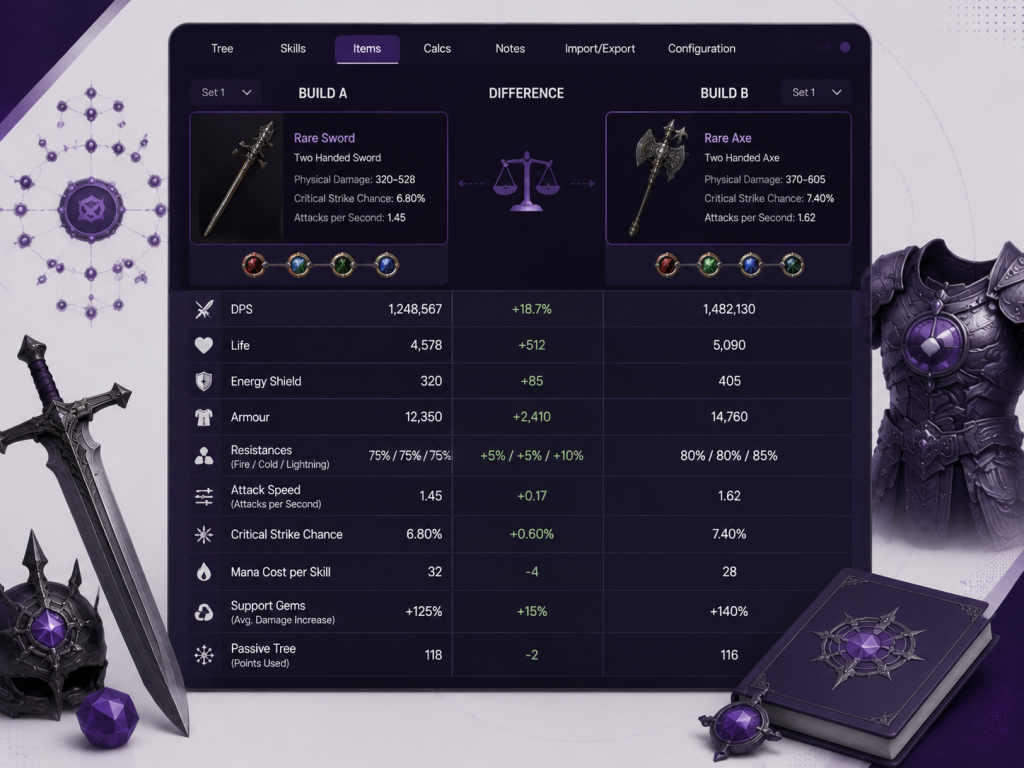
| Comparison | What to Check |
|---|---|
| Weapons | DPS, critical chance, and attack speed |
| Armour | Life, energy shield, armor, and resistances |
| Support gems | Damage increase, mana cost, and skill speed |
| Passive nodes | Point cost and overall benefit |
Comparisons should use the same configuration settings so that the results remain accurate.
Using Min-Maxing Tools and Stat Prioritization
Min-maxing means improving a build by selecting the most valuable items, modifiers, gems, and passive nodes. Path of Building allows players to test small changes and check which upgrade provides the greatest benefit.
Stat priority depends on the build. A critical strike build may value critical chance and multiplier, while a damage-over-time build may benefit more from skill levels and damage-over-time modifiers.
Improving Survivability, Clear Speed, and Damage
A strong build should balance damage, defense, and smooth gameplay. High DPS is less useful when the character has low resistances, weak recovery, or cannot survive powerful attacks.
Clear speed can be improved through movement speed, attack or cast speed, area of effect, and additional projectiles. Survivability may require more life, armor, evasion, block, spell suppression, or recovery.
Players should test one change at a time to understand its real effect on the build.
Safety, Legality, and Common Concerns
Path of Building is a third-party, offline planning tool. It calculates, builds separately, and does not automate gameplay or modify the Path of Exile game client. Players should download it from trusted project pages to avoid unofficial or altered files.
Is Path of Building Free and Safe to Use?
Path of Building Community Edition is free and open source. Its source code, releases, changelog, and license information are publicly available through the official GitHub project.
The official release is generally safe to use. However, users should avoid downloading from unknown websites, verify that they are using the correct Community Edition, and keep the application updated.
Can Path of Building Run on Mac and Linux?
Path of Building is primarily distributed for Windows, but it can also run on macOS and Linux via community-supported builds.
Linux users can install a community-maintained Flatpak version from Flathub.
For macOS, community builds are available, though installation and compatibility may vary by macOS version and processor. These versions may require more setup and troubleshooting than the Windows edition.
Troubleshooting and Practical Tips
Most Path of Building issues are caused by outdated versions, incorrect import links, missing build data, or unrealistic configuration settings. A few basic checks can solve many common problems.
Fixes for Common Import and Calculation Issues
If a build does not import correctly, check the following:
- Copy the complete build code or the sharing link
- Use an updated POBb.in or supported build link
- Confirm that the correct game version is selected
- Reopen PoB and try importing again
- Check whether gems, items, and the passive tree loaded properly
If DPS or EHP values appear incorrect, review the active skill, selected buffs, charges, enemy type, and item modifiers. Disabled gems or unsupported older items may also affect the calculations.
Keeping Builds Accurate and Updated
Use the latest stable version of Path of Building Community Edition. Updates can add support for new passive trees, skills, items, and league mechanics.
To keep a build accurate:
- Review the passive tree after major updates
- Check gem levels, quality, and support links
- Confirm equipment modifiers and resistances
- Use realistic Configuration tab settings
- Save a backup before making major changes
These checks help prevent misleading damage or defense results.
Frequently Asked Questions
These common questions explain how Path of Building handles shared builds, calculations, and offline use.
Can I Import Builds From Other Players?
Yes. Path of Building allows users to import build codes and supported sharing links from other players. After importing, review the passive tree, gems, equipment, and configuration settings to make sure everything loaded correctly. Save a separate copy before editing the build so the original version remains available.
How Accurate Are Path of Building Calculations?
Path of Building calculations are generally reliable when the build information and configuration settings are correct. However, the results are estimates based on selected buffs, enemy conditions, gear, and skill uptime. Actual gameplay may differ due to movement, player timing, temporary effects, and enemy mechanics, which can influence damage and survivability.
Can I Use Path of Building Offline?
Yes. Path of Building can be used offline after the application and required game data have been installed. Players can create builds, edit items, plan passive trees, and review calculations without an internet connection. Internet access is mainly needed for updates, character imports, trade searches, and opening some shared build links.
Conclusion
Path of Building is a valuable planning tool for Path of Exile players who want to test builds before spending in-game currency or passive points. It supports passive tree planning, gem testing, equipment comparisons, damage calculations, and defensive analysis.
For the best results, use an updated Community Edition, keep configuration settings realistic, and review imported builds carefully. This makes it easier to create balanced characters and make better upgrade decisions.
Latest Post:
Related Posts

Writen By
Laverne
Meet Laverne Silveira, the creative mind shaping the stories of Path of Building. With a knack for crafting immersive narratives, I transport players to captivating worlds where adventures unfold. Join me in exploring the boundless possibilities of gaming storytelling!


Leave A Reply